Recording Procedures Using the Power Button #
Follow these steps for recording a dataset using the power button. Note that while this method is practical, it lacks systematic component checks provided by the GUI. Ensure each step is completed carefully for accurate data collection.
Power On
- Turn on the RESEPI payload by pressing the power button.
Verify Camera Initialization
- Listen for two camera clicks. These clicks should occur approximately 1-2 seconds apart.
Check GNSS Quality
- Ensure that the GNSS LED is blinking alternately between red and green.
Start Recording
- Press the power button once to begin recording. Ensure GNSS fix and camera initialization are complete before starting.
Initial Static Alignment
- Wait for the static initialization to complete, which takes between 30 seconds to one minute, while continuing to record data on the ground (if you can wait a couple of minutes, all the better, but 30 seconds to one minute is sufficient for PPK/RTK).
Takeoff
- Take off vertically to reach the desired mission altitude.
Flight Maneuvers
- After takeoff, get up to altitude, then fly laterally (high velocity to engage navigation filter/heading corrections), at least 5m/s for 5 seconds.
Figure Eight Maneuver
- Perform at least one figure 8 (programmed into flight plan) at a constant altitude (horizontal plane).
Avoid Immediate Landing
- Do not land immediately after completing the figure eight. Complete any required hot swaps during the mission flight.
Continue Mission Flight
- Perform mission. For mission avoid sharp turns, smooth turns are critical. In corridor mapping consider S-shaped dynamics every ~2-3 minutes of straight corridor lines. You may land and hot-swap batteries as needed without needing to perform calibrations again as long as you do not terminate logging or shut off the drone/sensor.
Pre-Landing Maneuver
- After flight mission is complete, perform another figure 8 (also programmed into flight plan). After that fly laterally (high velocity to engage navigation filter/heading corrections in reverse solution), at least 5m/s for 5 seconds.
Landing
- Land vertically.
Final Static Alignment
- After landing, perform static initialization for period of 30 seconds to one minute on the ground. Continue logging data during this period.
Stop Recording
- Press the power button once to stop recording.
Power Down
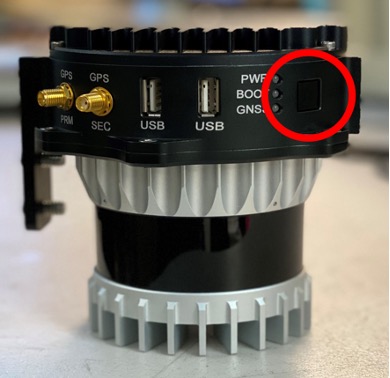
- Shut down the device by holding the power button for 4 seconds, as shown in Figure 1. The unit may remain on briefly after button release to complete data logging to the USB drive.